
Draft Notes - Notepad1.8.0.62 - Google Play
You'll be able to see results in few seconds.
Publisher Description
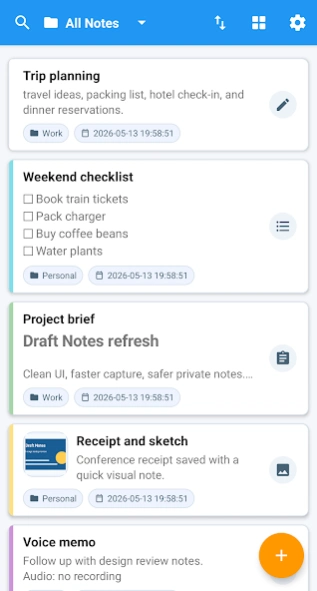


Simple, powerful note-taking with folders, checklists, and encryption
📝 Your Personal Note-Taking Companion
Draft Notes is a fast, elegant note-taking app designed for people who value simplicity and organization. Whether you're jotting down quick ideas, managing projects with folders, or securing private thoughts with encryption, Draft Notes has everything you need - without the clutter.
🆕 NEW: Folder Organization - Finally organize your notes into custom folders! Create work notes, personal journals, shopping lists, and more - each in its own dedicated space.
✨ KEY FEATURES
📁 ORGANIZE WITH FOLDERS (NEW!)
• Create unlimited custom folders
• Move notes between folders with a tap
• Quick folder selector for instant filtering
• See note counts for each folder
• Drag-and-drop to reorder inside folders
📋 FLEXIBLE NOTE TYPES
• Simple Notes - Fast text notes
• Extended Notes - Rich formatting with bold, italic, colors
• Checklists - Interactive to-do lists
• Image Notes - Add photos to your notes
🎨 BEAUTIFUL CUSTOMIZATION
• 9 vibrant colors
• Rich text formatting
• Text colors and highlighting
• Bullet and numbered lists
🔒 HIGH-GRADE SECURITY
• PIN Lock - Protect your app with 4-digit PIN
• Biometric Authentication - Fingerprint and face recognition
• Note Encryption - Password-protect individual notes
• Auto-lock timeout (1-60 minutes)
• Privacy-first - All data stored locally on your device
🔍 POWERFUL SEARCH
• Lightning-fast search across all notes
• Search by keywords in titles and content
⚡ SMART FEATURES
• Drag-and-drop note reordering
• Pull-to-refresh
• Auto-save drafts
• Share notes with other apps
💡 PERFECT FOR
• Students - Class notes organized by subject
• Professionals - Project management and meeting notes
• Writers - Story ideas and character notes
• Everyone - Shopping lists, journals, recipes, reminders
🌟 WHY CHOOSE DRAFTNOTES?
✅ 100% Free - No subscriptions, no ads
✅ Privacy-Focused - Data stays on your device
✅ Lightweight - Fast performance
✅ No Account Required - Start immediately
✅ Offline-First - Works without internet
🌍 Multi-language support: English, Spanish, German, Polish, Czech, Hindi, Bengali
📱 How It Works:
1. Open the app - No login required!
2. Tap the + button - Choose your note type
3. Start typing - Auto-saves as you write
4. Organize with folders - Create and move notes
5. Customize colors - Make notes stand out
6. Lock it down - Enable PIN protection
That's it! Simple, fast, and powerful.
🔐 Privacy Policy: All notes stored locally. No cloud sync, no data collection, no analytics. Your data is 100% yours.
About Draft Notes - Notepad
The company that develops Draft Notes - Notepad is R10 Studio. The latest version released by its developer is 1.8.0.62.
To install Draft Notes - Notepad on your Android device, just click the green Continue To App button above to start the installation process. The app is listed on our website since 2026-08-04 and was downloaded 0 times. We have already checked if the download link is safe, however for your own protection we recommend that you scan the downloaded app with your antivirus. Your antivirus may detect the Draft Notes - Notepad as malware if the download link to com.xanh.draftnotes is broken.
How to install Draft Notes - Notepad on your Android device:
- Click on the Continue To App button on our website. This will redirect you to Google Play.
- Once the Draft Notes - Notepad is shown in the Google Play listing of your Android device, you can start its download and installation. Tap on the Install button located below the search bar and to the right of the app icon.
- A pop-up window with the permissions required by Draft Notes - Notepad will be shown. Click on Accept to continue the process.
- Draft Notes - Notepad will be downloaded onto your device, displaying a progress. Once the download completes, the installation will start and you'll get a notification after the installation is finished.
Program Details
System requirements
Download information
Pricing
Version History
version 1.8.0.62
posted on 2026-08-04
New: Back up and restore your notes!• Create a password-protected, encrypted backup of all your notes and folders — including photos and voice memos• Restore your notes on this device or a new one• Add the backup to your existing notes, or replace everything• Review conflicts and choose which version to keep, note by note• Your data is automatically protected if an import gets interruptedAlso: improved app stability and a smaller download size.
version 1.8.0.62
posted on 2026-08-04
New: Back up and restore your notes!
• Create a password-protected, encrypted backup of all your notes and folders — including photos and voice memos
• Restore your notes on this device or a new one
• Add the backup to your existing notes, or replace everything
• Review conflicts and choose which version to keep, note by note
• Your data is automatically protected if an import gets interrupted
Also: improved app stability and a smaller download size.
version 1.8.0.54
posted on 2026-05-13
- Updated visual design across notes, editor, settings, and dialogs.
- Added dark mode with a manual theme setting.
- Added list/grid view switching for notes.
- Improved note cards, menus, and overall UI polish.
version 1.8.0.51
posted on 2026-01-04
🎙️ NEW: Voice Notes with Waveform Visualization!
Record voice memos up to 5 minutes with visual waveform display. Perfect for:
• Quick voice memos and ideas
• Meeting notes and interviews
• Lecture recordings
Features:
✓ Waveform visualization
✓ Playback speed control
✓ Skip forward/backward
Capture your thoughts instantly with voice!
version 1.8.0.44
posted on 2023-11-30
Minor bug fixes.
Disclaimer
Official Google Play Link
We do not host Draft Notes - Notepad on our servers. We did not scan it for viruses, adware, spyware or other type of malware. This app is hosted by Google and passed their terms and conditions to be listed there. We recommend caution when installing it.
The Google Play link for Draft Notes - Notepad is provided to you by apps112.com without any warranties, representations or guarantees of any kind, so access it at your own risk.
If you have questions regarding this particular app contact the publisher directly. For questions about the functionalities of apps112.com contact us.
